Approval before every change. Evidence after it.
Recobr

Employee access command center

One company.
Every employee access.
Under control.

Recobr discovers every known employee access, prepares a reviewable plan, and executes only what it can verify. Everything else becomes guided work with evidence.

Dry run before actionReal capability by providerAuditable evidence
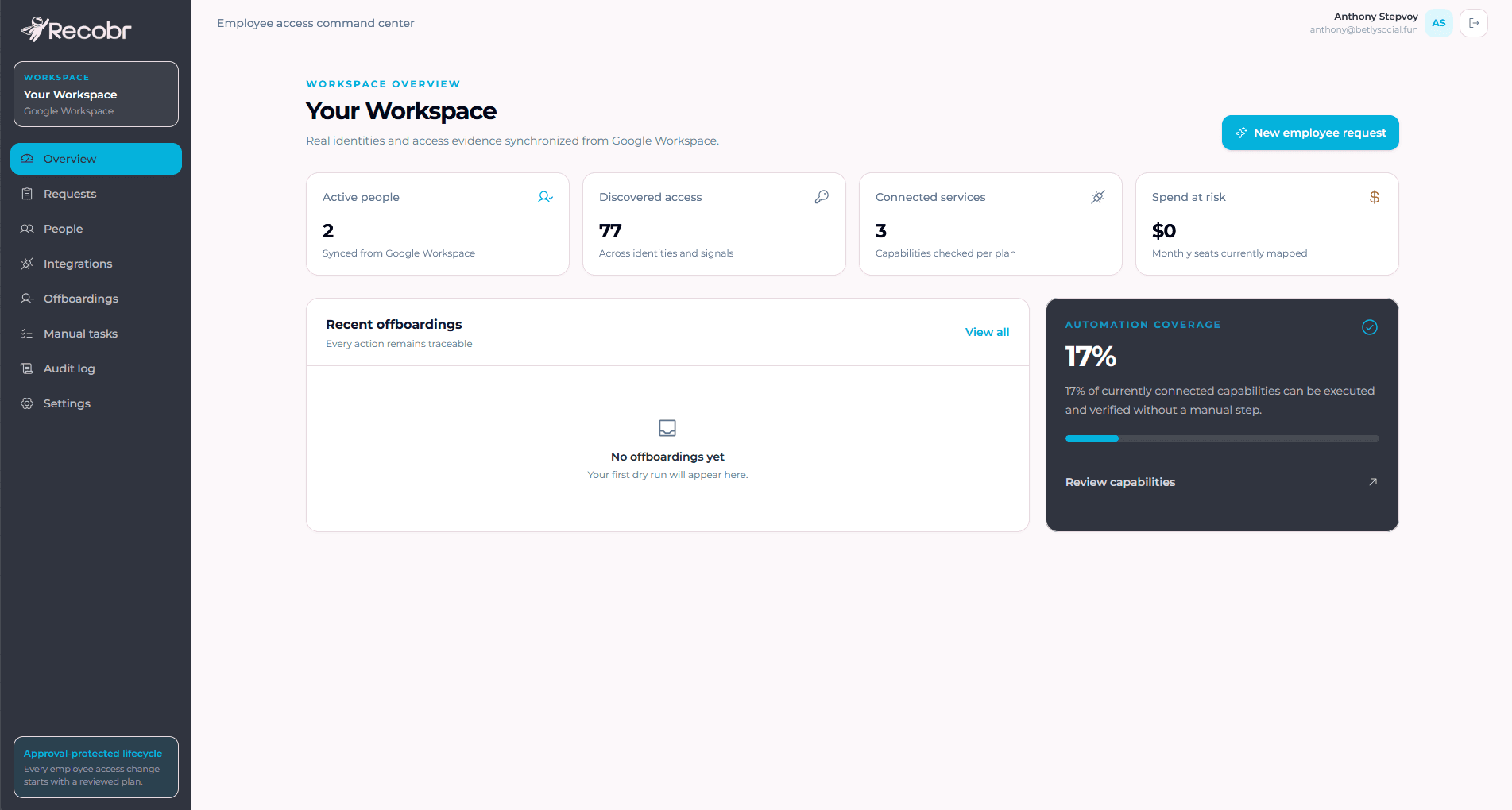
Recobr workspace overview showing active people, discovered access, connected services, and automation coverage
Real Recobr workspace overview

One identity, many signals

Start with Google Workspace. Add connectors when they can prove control.

  • Google Workspace
  • Gmail
  • Gemini
  • GitHub
  • Slack
  • Notion
  • OpenAI
  • Claude
  • Figma
  • Canva
  • Adobe
  • Google Chrome

Discovering an app does not prove a paid seat was reclaimed or an external account was closed. Recobr keeps that boundary visible.

One access lifecycle

Access changes with people. Control should not get lost.

Onboarding, role changes, and departures follow the same rule: preview the plan, approve it, then act.

  1. 01
    Joiner

    Prepare day one

    Turn a new-hire request into a reviewable identity and initial-access plan.

  2. 02
    Mover

    Adjust every role change

    Remove inherited permissions and assign only what the new role needs.

  3. 03
    Leaver

    Close the loop

    Revoke what can be verified, guide the manual work, and preserve evidence of every outcome.

Product, not promises

See what exists, what will change, and what was actually resolved.

Recobr separates discovery, authorization, execution, and verification so a signal never becomes a destructive action by accident.

01 · Discover

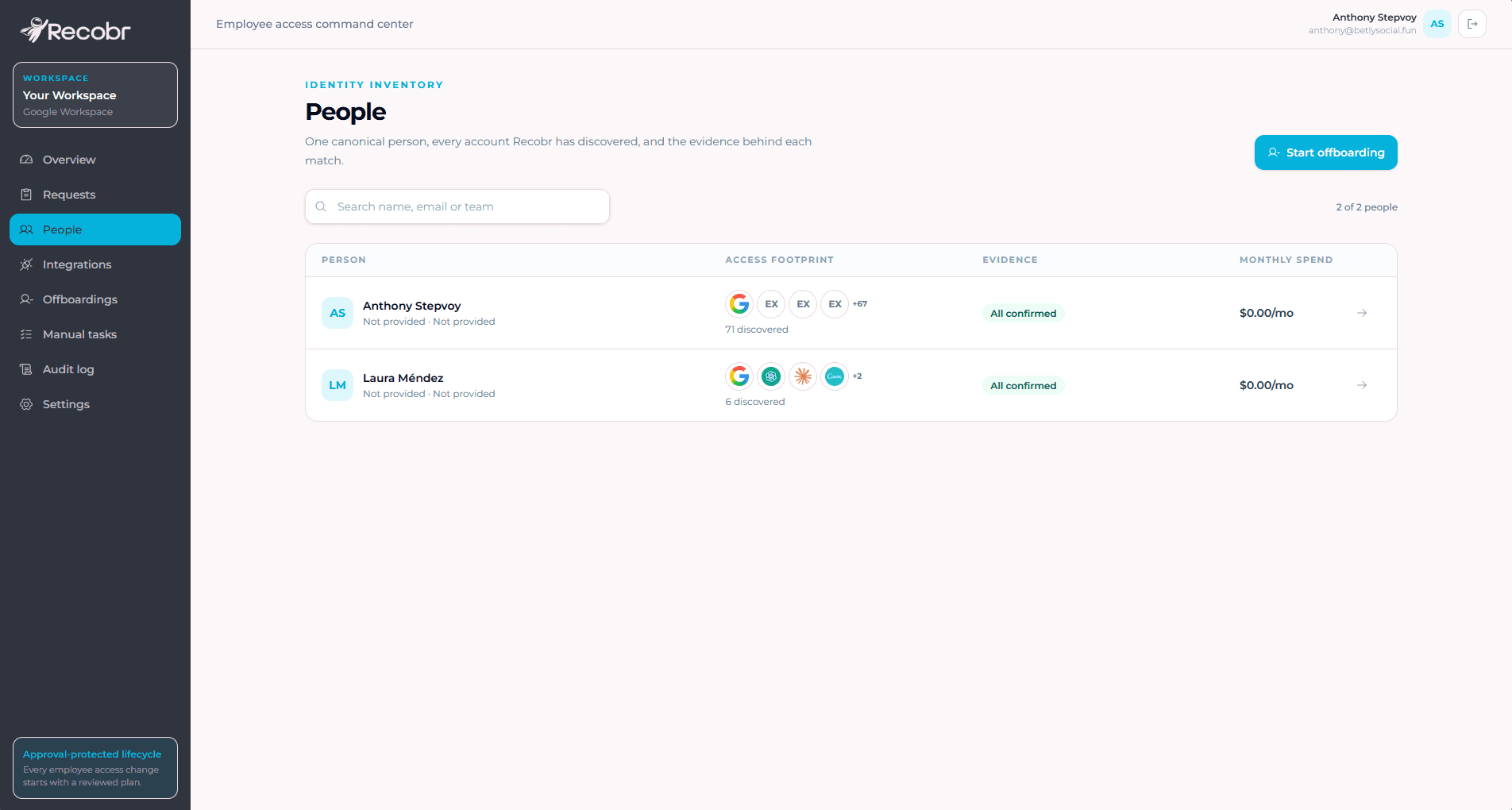
One canonical person. Every signal keeps its source.

Directory, OAuth, and direct connectors appear together without erasing their differences. Found does not automatically mean paid seat or available action.

  • Visible source and timestamp
  • Conservative identity matching
  • Confidence separated from capability
Recobr people inventory showing each person's access footprint, evidence, and monthly spend
Real Recobr people and access inventory
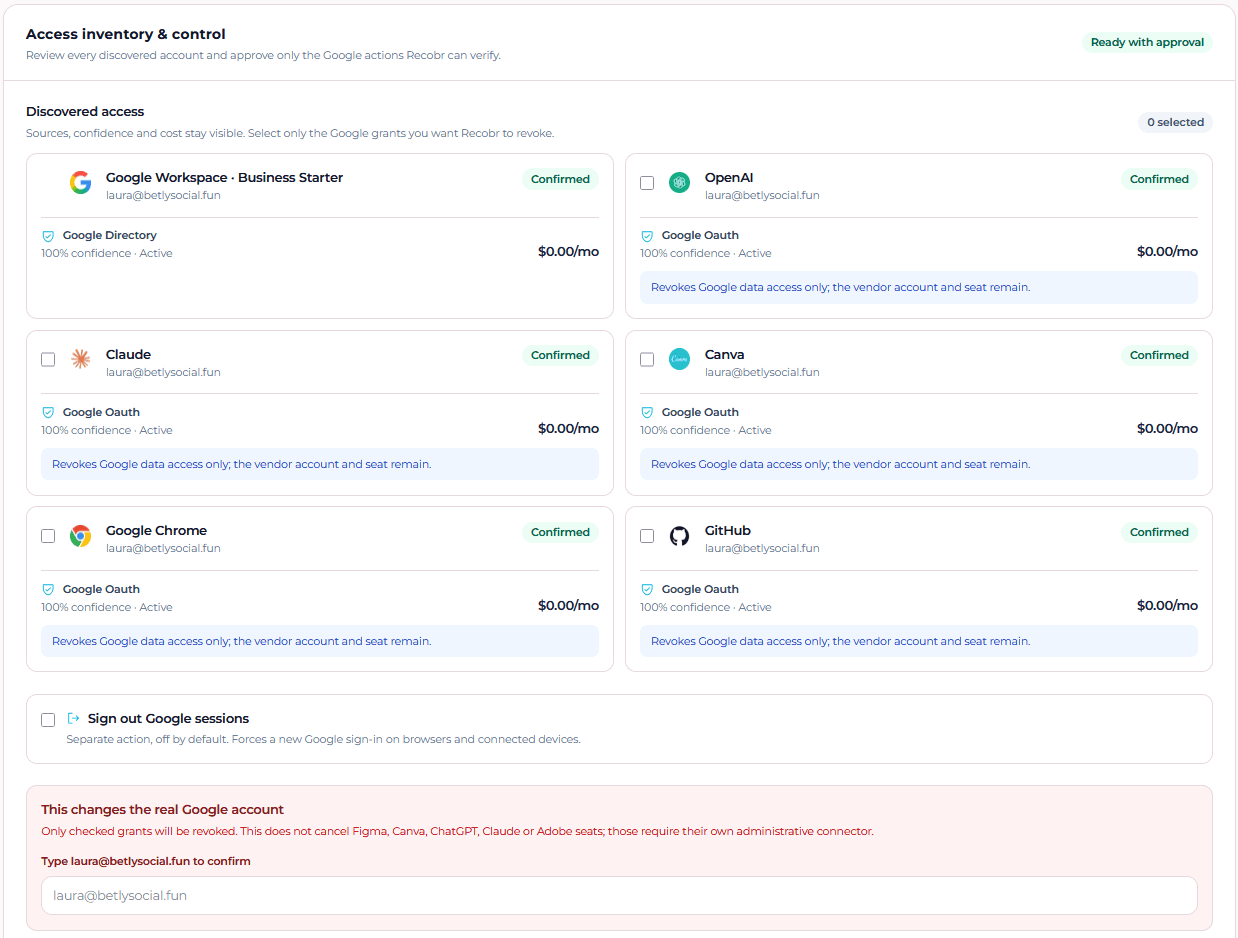
Recobr approval view showing discovered access, the scope of every action, and email confirmation
Real access inventory and approval view
02 · Review

The scope is written down before an account is touched.

Every OAuth grant starts unselected. Recobr explains what it can revoke, what remains active outside Google, and what requires a provider's own admin connector.

Signing in to Recobr never grants Workspace administration on its own.

03 · Verify

An API response is not the same as finished work.

After execution, Recobr checks the authoritative source again. If the external SaaS remains active, it creates follow-up work and keeps the outcome partial.

Explore Recobr

Execution trace

  1. 01

    Executed by Google

    Data access was revoked and verified again.

    Verified
  2. 02

    External provider

    Account, session, and seat keep independent states.

    Review needed
  3. 03

    Evidence and audit

    Actor, time, outcome, and next step remain recorded.

    Saved

Stop access leakage

Orphaned accounts keep billing. Unowned keys keep spending.

Recobr connects access to ownership and monthly cost, exposes recurring leakage in the dry run, and keeps potential recovery separate from money actually confirmed as saved.

Visible leakage

-$215/mo

Potential recovery

+$215/mo

Illustrative monthly view · example values, not customer outcomes

OpenAI

API key

Rotation required

former.engineer@company.com

Monthly spend at risk

-$180/mo

Usage continues after the owner leaves

Potential monthly recovery

+$180/mo

Canva

Pro seat

Seat still active

former.designer@company.com

Monthly spend at risk

-$15/mo

A paid seat is still assigned to a former employee

Potential monthly recovery

+$15/mo

Claude

Pro account

Cancellation pending

former.ops@company.com

Monthly spend at risk

-$20/mo

The subscription continues billing after departure

Potential monthly recovery

+$20/mo

Potential savings are never counted as recovered from discovery alone. Recobr confirms them only after the key, seat, or subscription was handled and the result was verified.

Before and after

A spreadsheet remembers tasks. Recobr proves outcomes.

The change is not another checklist. It is turning every access into an action with scope, owner, status, and evidence.

Comparison between manual access management and Recobr
Manual managementRecobr
Access scattered across memory, chats, and spreadsheetsOne canonical person with every known access signal
Changes executed without a complete previewDry run and explicit approval before action
A checklist marked doneVerified outcome, evidence, and next step
The same automation promise for every provider and planEvery action is labeled automatic, guided, or unsupported
Savings assumed as soon as a license is detectedEstimated savings kept separate from confirmed savings

Verifiable trust

We do not promise magic. We show the outcome.

These numbers come from the real product lab and are labeled accordingly. They are not customer or commercial metrics.

accesses and signals visible in the test workspace
77
real OAuth grant revoked and verified by resync
1/1
separate states for account, session, seat, and Google access
4
actions preselected or executed without confirmation
0

Non-negotiable rules

Security also means stating exactly what could not be closed.

  • Least privilege

    Sign-in and administrative consent stay separate, with incremental scopes only when needed.

  • Visible approval

    No sensitive action starts without a plan, clear scope, and explicit confirmation.

  • Never fake success

    Automatic, manual, or unsupported: every capability declares its real limit.

  • Durable evidence

    Actor, time, source, result, error, and next step remain traceable.

Straight answers

The limits are part of the product, too.

Recobr is built to reduce real work without hiding the boundaries of Google, each SaaS provider, or their plans.

Can Recobr close every SaaS automatically?

No, and Recobr never pretends otherwise. Automation depends on each provider's API, plan, and actual permissions. Anything it cannot execute becomes guided work with required evidence.

Does signing in with Google grant administrative access?

No. Recobr sign-in and Google Workspace administrative consent are separate steps. The second shows its permissions and can be granted incrementally.

How does Recobr avoid acting on the wrong person?

Recobr keeps the source and confidence of every identity, does not execute on ambiguous matches, produces a dry run, and requires approval. Sensitive actions may require the employee's exact email as confirmation.

What happens when manual work remains?

Execution ends as partial, not successful. Recobr assigns a concrete instruction, keeps the work pending, and resolves it only when evidence shows the account, sessions, and seat were handled.

Does Recobr replace a password manager or enterprise IAM?

No. Recobr orchestrates access lifecycle work for teams that need more control than a checklist without adopting a complex IAM suite on day one.

Which teams is Recobr designed for first?

Google Workspace companies with roughly 10 to 150 people, many SaaS tools, and a founder, operations, People, or IT owner currently running the process manually.